On this page
Your team probably doesn't have a content problem. It has a coordination problem.
The usual signs are easy to spot. Ideas live in Slack. Briefs sit in docs no one can find. A draft gets written, then waits on review, then gets published late, then nobody repurposes it, then reporting shows up two weeks later in a spreadsheet someone built on the fly. The team stays busy, but the system doesn't get stronger.
That's why content marketing automation matters now. Not as a posting tool, and not as a shortcut for pumping out more AI copy. It matters as an operating system. The teams that scale aren't just generating faster. They're orchestrating briefs, approvals, publishing, community distribution, and feedback loops in a way that can run repeatedly without heroics.
Why Content Marketing Automation Matters Now
Monday starts with a draft that is ready to publish. By Thursday, it is still waiting on a product check, the designer missed the asset request, social never got channel copy, and nobody posted the customer takeaway in your community. The problem is not effort. It is a content operation held together by reminders and good intentions.
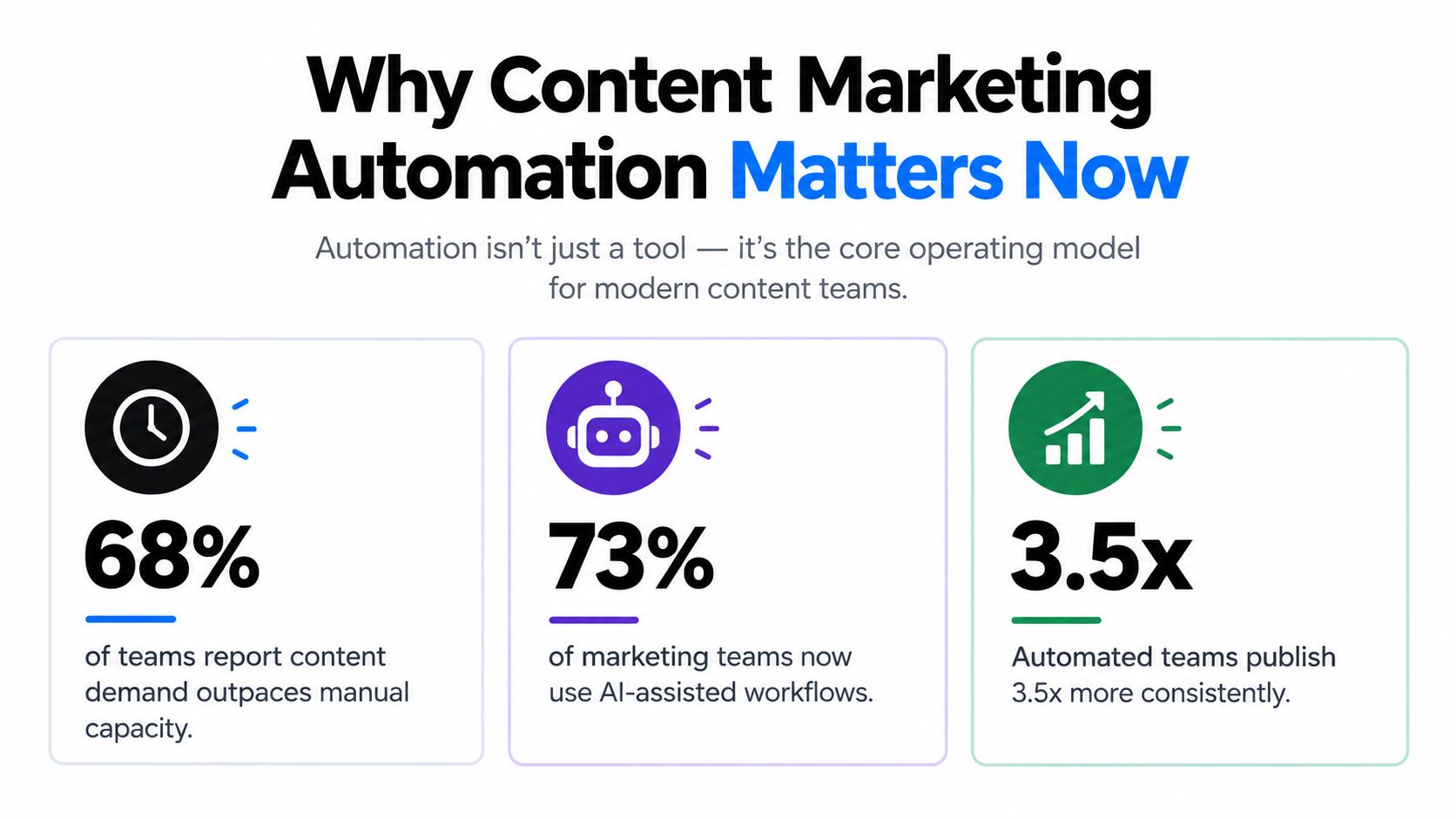
That strain is showing up across marketing teams. In Deloitte Digital's 2024 marketing content automation study, leaders reported a sharp rise in content demand across the previous two years while generative AI use for content ideation also increased. More output pressure plus more channels usually exposes the same weakness. Teams have publishing tools, but they do not have a reliable operating system for planning, approvals, distribution, and feedback.
What breaks first in a manual team
Writing is rarely the first thing to fail.
A lean team can still produce a strong blog post or webinar script by hand. The breakdown happens in the handoffs around it. Intake is inconsistent. Briefs vary by owner. Reviews stack up in Slack. UTM rules change by channel. Community posts get skipped because they are nobody's explicit job. Reporting arrives late, so the next round of content gets planned without clean feedback from the last one.
That is why teams can add AI and still feel slow. Faster drafting does not fix unclear ownership or scattered execution.
Automation works when it removes waiting, not just typing.
HubSpot reports that marketers use automation well beyond email sends, including administrative work, reporting, content creation, and media support, as noted in its marketing statistics research. The practical point is bigger than any single percentage. Automation has expanded from task assistance into workflow orchestration.
What automation covers now
A useful setup usually spans five layers:
- Intake and planning that capture ideas from SEO, sales, support, and community channels in one format
- Production support for outlines, drafts, metadata, image requests, and repurposing prompts
- Governance and approvals that route legal, brand, product, or founder review based on content type
- Distribution orchestration across CMS, email, social, and community publishing queues
- Measurement loops that push channel and conversion data back into the brief template and editorial calendar
That last part gets missed often. Automation is not only about shipping faster. It should also make the system easier to govern and easier to audit. If a workflow saves two hours but creates brand drift, duplicate posts, or bad attribution, the automation is doing damage in a cleaner interface.
Teams early in adoption usually start with drafting because it feels immediate. A better first question is which recurring steps create delay, rework, or channel drop-off. For a grounded starting point, Bazzly's guide on how to use AI in marketing covers where AI fits inside a controlled workflow instead of replacing the workflow.
The teams that benefit most from content marketing automation are not the ones posting the most. They are the ones that can turn one approved idea into a brief, asset request, publish-ready package, channel variants, community prompts, and performance notes without rebuilding the process every week.
Mapping Your Current Workflow Before You Automate
The fastest way to waste time with content marketing automation is to automate a bad process. If your approvals are unclear, your briefs are inconsistent, and your reporting is scattered, more tooling just helps that confusion move faster.
Start by mapping the workflow you already have. Not the clean version in your head. One your team is using this week.
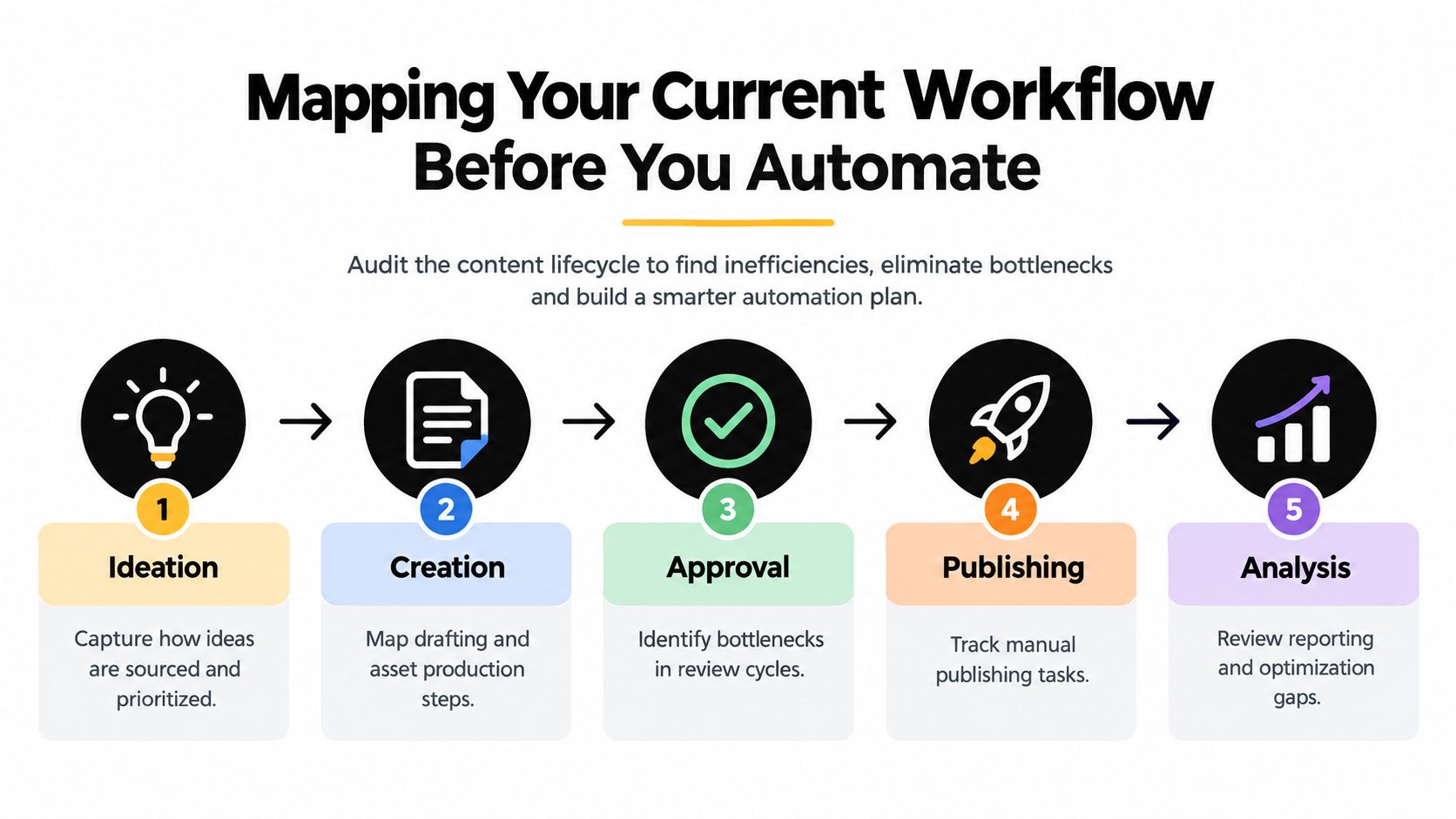
Audit the lifecycle from idea to insight
Take one content type first. A blog post is usually the easiest. Walk it through the full lifecycle:
-
Idea intake
Where do ideas come from now? Sales calls, founder notes, SEO research, support tickets, community threads, customer questions. Plenty of ideas exist. They just don't have a clean intake system. -
Brief creation
Who turns the idea into something usable? If every brief looks different, you've already found a major automation opportunity. -
Drafting and asset production
Track who writes, who gathers examples, who creates visuals, who checks links, and where version confusion starts. -
Review and approval
Most hidden delays live here. A draft may be technically done but still blocked by unclear ownership. -
Publishing and reporting
Note every manual step after final approval. CMS formatting, metadata entry, social adaptation, newsletter insertion, UTM naming, performance snapshots. These chores add up fast.
Use the same exercise for newsletter workflows, webinar promotion, product updates, and community posts. The point isn't perfection. It's visibility.
Decide what to automate, keep human, or kill
Once the workflow is visible, sort each step into three buckets.
- Automate it when the task is repetitive, rules-based, and easy to validate
- Keep it human when judgment, positioning, or brand nuance matter most
- Remove it when nobody can explain why the step still exists
A lot of teams discover they don't need more automation first. They need fewer steps.
Practical rule: If a step creates no better decision, no better asset, and no measurable record, it's probably process residue.
This is also where audience insight matters. If your content backlog keeps growing because briefs don't reflect what buyers care about, fix that before adding triggers and templates. Bazzly's article on how to identify customer pain points is a useful lens for tightening content inputs before you automate outputs.
Build an automation backlog
Don't turn your audit into a giant transformation project. Turn it into a short backlog.
A useful backlog usually includes items like:
- Standardize the brief so every draft starts with the same required inputs
- Auto-assign owners when a content request enters the system
- Create status stages that show where each asset is blocked
- Generate first-pass derivatives such as email blurbs or social variants after approval
- Trigger reporting snapshots after publication so the team reviews outcomes consistently
Here's a simple decision table to make that backlog sharper:
| Workflow area | Good candidate for automation | Better left human-led |
|---|---|---|
| Idea capture | Repeated intake forms, tagging, routing | Final prioritization |
| Briefing | Template population, background assembly | Angle selection |
| Drafting | Outlines, variants, metadata | Original point of view |
| Review | Notification, reminders, status changes | Editorial judgment |
| Reporting | Data pull, dashboard refresh | Interpretation and next action |
If you do this work well, your tooling decisions get easier. You stop shopping for “AI content platforms” in the abstract and start solving named workflow problems.
Building Your Automated Content Engine
Once the workflow is mapped, build the engine in layers. Teams get into trouble when they start with a big tool purchase instead of a simple system design. The best content marketing automation setups are usually boring on purpose. Clear templates. Clear ownership. Clear handoffs.
That's what makes them durable.
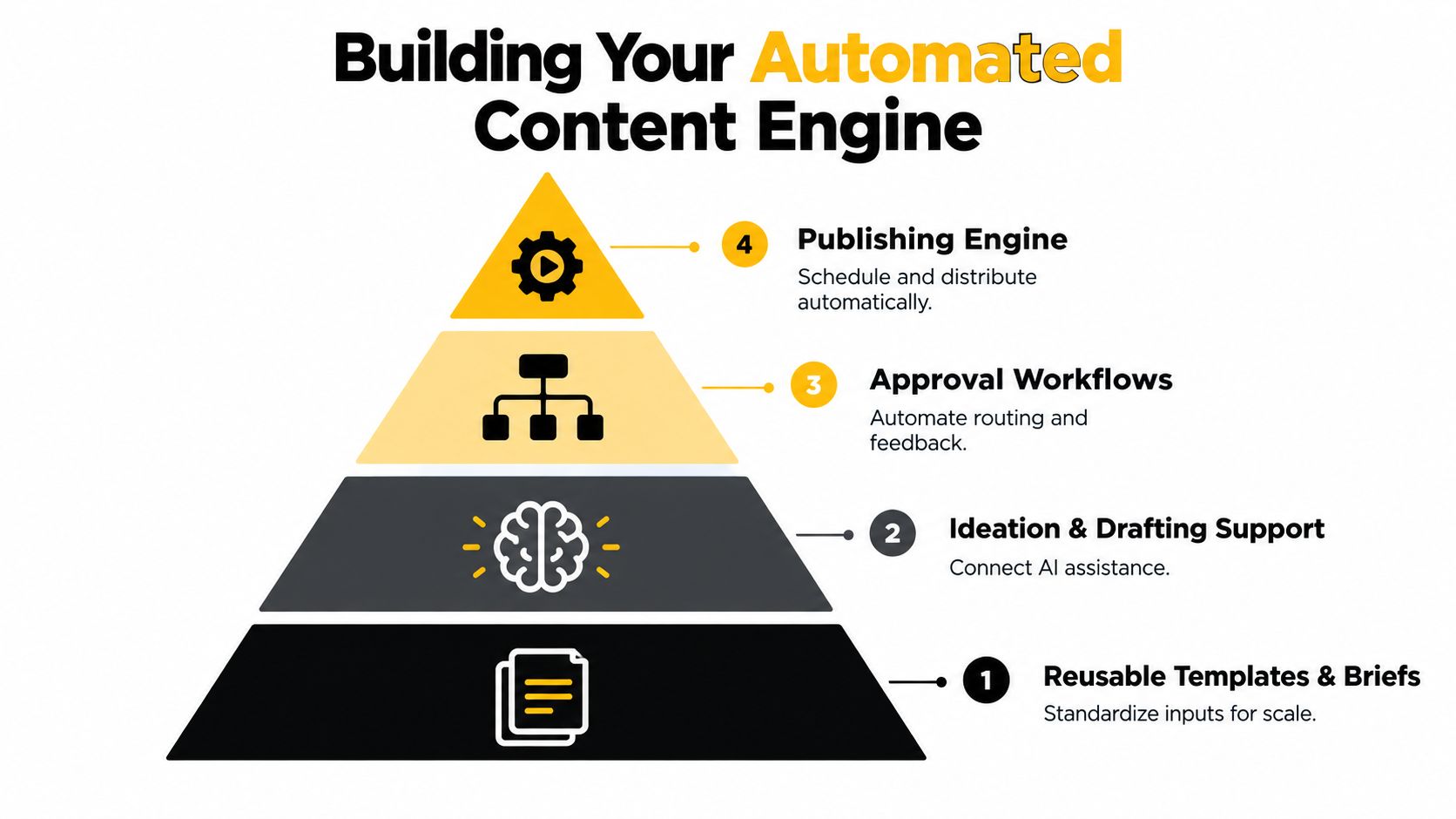
Start with the template layer
Every automated engine needs consistent inputs. If one writer gets a complete brief and another gets “can you draft something about attribution?” your system won't scale.
At minimum, standardize these fields in your content brief:
- Audience and use case
- Core problem
- Desired action
- Supporting proof or source material
- Must-cover points
- Must-avoid claims
- Distribution plan after publish
That last field matters more than expected. If distribution isn't defined before drafting starts, repurposing gets bolted on later and often never happens.
A good template also protects quality. It forces the requester to supply context before the writer or AI assistant starts generating anything.
Add drafting support without surrendering the angle
AI is useful in the drafting layer when you constrain it. Give it source material, approved framing, a target audience, and a clear job. Don't ask it to invent a point of view from scratch.
For practical teams, drafting support usually works well for:
- outlines
- title options
- section expansion from approved notes
- meta descriptions
- FAQ extraction
- channel-specific rewrites
It works badly when you expect it to create real conviction, customer insight, or differentiated thinking without human input.
If you're comparing approaches for automated social content generation, it helps to evaluate them based on workflow fit, not just generation quality. A decent generator that plugs into your approval system is often more useful than a smarter one that creates review chaos.
After the draft layer is in place, train the workflow around approval and publication. This video gives a good visual overview of how teams think about that shift in practice.
Route approvals like operations, not like favors
Approval systems fail when they rely on social dynamics. Someone “takes a quick look” when they have time. That doesn't scale.
Instead, define review paths by content type:
- SEO article goes to editor, then subject matter reviewer, then publisher
- Product launch page goes to product marketing, legal if needed, then web owner
- Founder post goes to founder for voice pass, then social owner for formatting
Each route should answer three things. Who reviews. What they review for. How long that review has before the system escalates.
If reviewers don't know their job in the workflow, they review everything. That's how one approval turns into six rounds of vague comments.
Keep tooling lean and visible
You do not need a massive stack to build a content engine. Most small teams can run effectively with a project tracker, a document layer, a CMS, an automation connector, and one AI writing assistant.
What matters is version control and observability. Everyone should be able to answer these questions quickly:
- What's in draft?
- What's waiting for approval?
- What was published this week?
- What derivatives were created automatically?
- What stalled and why?
Tool choice matters less than workflow visibility. A simple setup that everyone uses beats a powerful setup that only one operator understands.
Automating Distribution and Community Engagement at Scale
A lot of teams stop their automation work at publication. That's a mistake. Shipping the asset is only half the job. Distribution needs its own operating logic.
The strongest teams treat every published piece as a trigger. Once the source asset is approved, the system should know where else that idea belongs, when it should appear, and how the message changes by channel.

Build distribution trees, not one-off promotions
Think in trees.
A blog post might trigger a LinkedIn post, a newsletter snippet, a sales enablement note, a short customer email, and a community response queue. A webinar clip might trigger social cutdowns, a recap post, and follow-up discussion prompts for founder-led channels.
That doesn't mean every asset goes everywhere. It means each format has a pre-decided path.
A simple distribution tree often includes:
- Owned channels such as your site, newsletter, and lifecycle email
- Social channels where awareness and repeat exposure matter
- Sales-facing channels like enablement libraries or outbound snippets
- Community channels where buyers ask real questions in public
This last category gets ignored too often.
Community automation is different from broadcast automation
Community channels don't reward the same behavior as scheduled social posts. Timing matters more. Context matters more. Relevance matters more. A generic queue-based approach usually underperforms because communities are conversation-driven, not calendar-driven.
That's why Reddit, niche forums, and comment threads deserve their own workflow. The operational question isn't “How do we post more?” It's “How do we notice high-intent conversations quickly and respond with something useful?”
For a small team, that usually means:
- monitoring keywords and problem phrases
- routing promising threads to the right owner
- drafting response suggestions from approved product and brand context
- logging which conversations led to clicks, demos, replies, or follow-up questions
When a team wants to automate that layer more directly, one option is Bazzly, which monitors relevant Reddit conversations, drafts context-aware replies, and helps teams respond through managed workflows or their own accounts. The useful lesson isn't the tool itself. It's the channel model. Community automation works best when it's event-driven.
Good distribution automation doesn't just publish on time. It shows up where the buyer is already trying to solve the problem.
Personalization needs routing logic
The temptation with content marketing automation is to make one message travel everywhere. That saves time, but it usually weakens performance.
A better system routes the same underlying idea through different wrappers:
- a founder insight for LinkedIn
- a practical checklist for email
- a direct answer for Reddit
- a short problem-solution format for sales follow-up
That orchestration is where automation starts to feel like a real operating system. The machine isn't just pushing content out. It's matching format, moment, and audience with less manual effort.
Measuring What Matters and Keeping Automation Honest
A common failure pattern looks like this. The team ships more posts, more emails, more repurposed assets, and the dashboard still gets murky. Nobody can say which automations saved time, which ones hurt quality, or whether faster output produced better pipeline.
That is usually a measurement problem, not a tooling problem.
The gap between AI adoption and measurable impact shows up in industry research. According to CMI and MarketingProfs' 2025 B2B Content Marketing Benchmarks, Budgets, and Trends report, B2B marketers widely use generative AI for content tasks, but far fewer report clear gains tied to that use. Separate survey coverage has also found that teams use AI frequently without defining AI-specific KPIs. The operating lesson is straightforward. Usage is easy to count. Improvement is harder, and that is the part that matters.
Track workflow outcomes before channel attribution
Start with the mechanics of the system.
If automation is doing its job, the first wins show up in operations before they show up in attribution models. Drafts move faster. Reviews stall less often. Distribution steps happen on schedule. Community follow-up no longer depends on one person remembering to check a thread.
Track a small set of workflow KPIs first:
- time from brief approval to publish
- percent of assets shipped on the planned date
- review cycle count per asset
- percent of derivative assets produced from each core piece
- missed handoff rate between strategy, writing, design, approval, and publishing
- percent of community responses logged and tagged correctly
For lean teams, three views are enough. One for throughput, one for performance, and one for governance. If you need a starting point for baselines and thresholds, use this guide to content performance benchmarking.
The goal is not a bigger dashboard. The goal is to see whether the operating system is getting more reliable.
Pair business metrics with governance metrics
Teams get into trouble when they only measure speed and volume. Faster publishing can hide sloppy sourcing, off-brand drafts, weak intent matching, and half-reviewed community replies.
Use a balanced scorecard instead:
| KPI Area | What to Track | Healthy Signal |
|---|---|---|
| Workflow speed | Time from brief approval to publish | Cycle time drops without review bottlenecks increasing |
| Output consistency | Planned assets versus shipped assets | Publishing stays steady week to week |
| Search performance | Organic visibility and traffic for content produced through automated workflows | Search growth holds over time, not just at launch |
| Conversion quality | Signups, replies, demos, or assisted pipeline from content journeys | Content reaches people with real buying or problem-solving intent |
| Editorial quality | Revision rate, factual corrections, rejected drafts | Quality stays stable as volume rises |
| Governance | Human review completion, approval compliance, source checks, prompt/version logging | The system stays auditable |
I have seen teams miss one metric here in particular. Approval compliance. If people bypass the review path because the workflow feels slow, automation has not fixed the process. It has created a shadow process.
Measure channel economics where automation should win clearly
Email is a good test because the economics are usually visible. Broadcast sends can produce reach, but triggered sequences tend to perform better when they respond to behavior and stage.
Stripo's email automation benchmarks, based on large-brand email datasets, reported stronger revenue contribution and conversion efficiency from automated flows than from standard campaign emails. The exact numbers matter less than the pattern. Event-based automation usually beats batch sending because timing and context are built into the workflow.
Apply that same standard across content operations. If automated nurture, repurposing, or community routing does not outperform the old manual process on either speed, quality, or conversion, it needs to be revised or removed.
Keep community automation in the scorecard
This is one area teams under-measure.
If you automate Reddit monitoring, social listening, or forum response drafting, track more than clicks. Measure response time to relevant threads, qualified conversations surfaced, replies approved versus discarded, follow-up actions created, and downstream outcomes such as demo requests or sales-assist touches. Community automation can create value long before a last-click conversion shows up.
Good automation earns the right to stay in the system. It reduces manual drag, keeps governance intact, and improves performance you can verify.
Your Scaling Playbook and Next Moves
The teams that scale content well don't automate everything. They automate the parts that repeat, document the parts that matter, and keep humans close to the decisions that shape trust.
That's the operating model. Not “AI writes our content.” More like, “Our system routes work cleanly, creates drafts faster, gets the right eyes on them, distributes them properly, and tells us whether the machine is helping.”
A practical rollout cadence
For the next month, keep the scope tight.
-
First 30 days
Map one workflow end to end. Standardize one brief template. Define approval roles. Pick one content type to automate partially. -
Next 60 days
Add publishing triggers, derivative generation, and basic reporting. Fix the handoffs that keep causing delays. -
Next 90 days
Expand to distribution trees, community monitoring, and governance reviews. Only add more tools if the current process is visible and adopted.
This pacing prevents a common failure mode. Teams buy a stack, generate a burst of activity, then discover nobody trusts the output or owns the maintenance.
Know when to add automation and when to add people
If your delays come from repetitive admin, routing, formatting, repurposing, or reporting, automate first.
If your delays come from weak positioning, lack of subject matter expertise, or founder dependency for strategic insight, hire or reassign humans first. No workflow tool can fix missing judgment.
A good rule is to add automation when the task is stable. Add people when the problem requires interpretation.
Takeaway: Content marketing automation scales best when you treat it like operations design. Templates first. Routing second. Measurement third. More tools only after those three are working.
The payoff isn't just speed. It's reliability. A lean team with a strong system can out-execute a larger team that still runs on inboxes and memory.
Bazzly helps small teams automate one of the most neglected parts of content operations, which is turning high-intent Reddit conversations into a repeatable acquisition channel. If your content engine already creates useful ideas but your team can't monitor and respond across community threads consistently, visit Bazzly to see how it fits into a broader content marketing automation workflow.
Written by Bazzly Team
Bazzly builds software that finds buyer conversations on Reddit and posts helpful replies in them (227,592 posts flagged for customers since June 2, 2025). The Bazzly numbers we quote come from our own data, published with the method in our research studies. About us


