Finding and acting on opportunities
Use the Opportunities page to find the right threads and write replies that actually land.
The Opportunities page is where most of the work happens in manual mode: Bazzly brings you the Reddit posts worth replying to, and you decide which ones get a comment, what it says, and how it is posted. This article covers every element of the page and the full path from opening a post to seeing your comment in the Reply Queue.
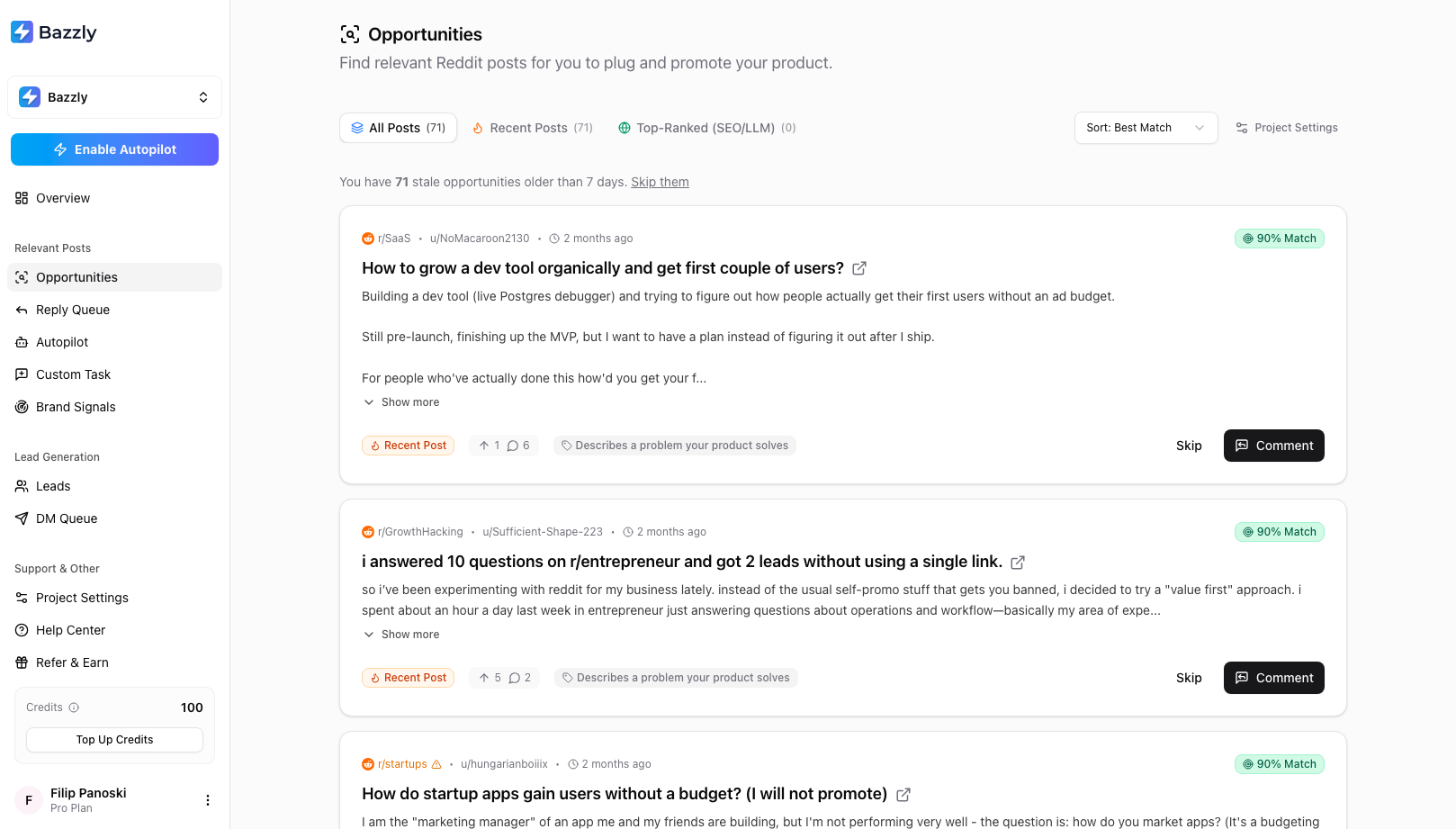
Each card is a real Reddit thread. The match badge is how closely it fits your product; hover it to read why.
Reading the page
Tabs. All Posts shows everything. Recent Posts are fresh threads caught by subreddit monitoring, where a fast reply pays off. Top-Ranked (SEO/LLM) are threads that already rank on Google for one of your searches; a reply there keeps sending traffic for months.
Sort. Best Match (default) puts the highest scores first. Most Recent orders fresh posts by when Bazzly found them and top-ranked posts by when they were written on Reddit, so an old thread that was just re-checked does not jump to the top.
Stale banner. Opportunities older than seven days are counted at the top of the list with a Skip them link. Skipping is bulk-dismissal with a five-second Undo in the toast.
What a card tells you
- r/subreddit, u/author, age. If the subreddit name turns amber with a warning icon, that community is strict about promotion and the post is not asking for tool recommendations or mentioning your product. Warmed-account comments there carry a higher removal risk.
- Match % with the AI's reason on hover. Green is 80% and above, orange from 60%, red below.
- Post title and body, with Show more to expand and an external-link icon to open the thread on Reddit.
- Source badge: Recent Post or Top-Ranked. Top-ranked posts also show the keyword they rank for, the Google position, and an estimated monthly visits figure.
- Classification, for example Is looking for a product like yours or Describes a problem your product solves. Posts asking for recommendations or comparing tools are the strongest buying signals.
- Upvotes and comments on the Reddit post, with the time it was last checked.
Skip
Skip removes the opportunity from your list immediately. There is no confirmation and no undo on a single skip, so use it once you have decided. Skipping never costs anything. If the post was a genuine fit and you skipped it by mistake, you can still reply to it by pasting its URL into Custom Task.
Comment: the composer
Click Comment to open the composer under the card.
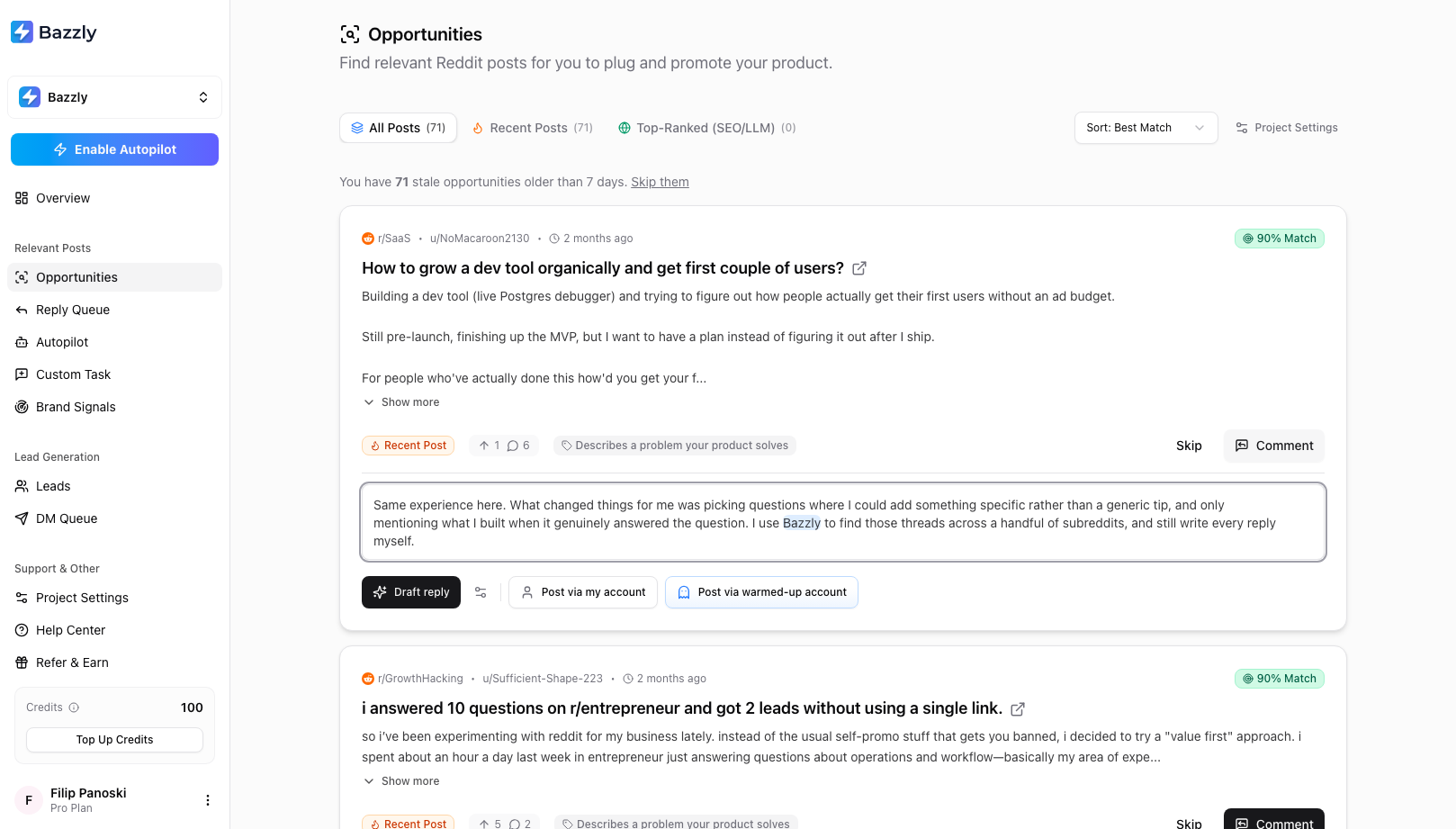
Draft, edit, then choose how the comment goes out.
- Draft reply asks the AI for a comment that answers the post and mentions your product where it fits. A draft costs 0.1 credits. You can draft again if you want a different angle.
- Edit the text directly. Make it sound like you and make sure it helps the person before it mentions your product. Your product name is highlighted so you can see where it lands.
- The settings icon next to Draft reply opens AI Reply Instructions for this project. Anything you write there ("keep it under 80 words", "mention our free tier") applies to the next draft.
- Pick a posting method:
- Post via warmed-up account: Bazzly posts through an aged, credible account. Costs 10 credits. Your account is never involved.
- Post via my account: the comment is queued for the Bazzly browser extension to post from your own Reddit account. Free.
The composer will warn you when something is off:
- This post has been removed or deleted. Skip it.
- Links increase removal risk. Warmed-account posting is off. Remove the URL to post through a warmed-up account, or post from your own account at your own risk.
- Subreddit strict on promo. In strict subreddits, warmed-account posting is only available when the post is asking for tools or already mentions your product, and removed comments there are not refunded.
Comments must be between 3 and 4,000 characters.
Adding upvotes
After you pick a posting method, Bazzly asks whether to boost the comment.
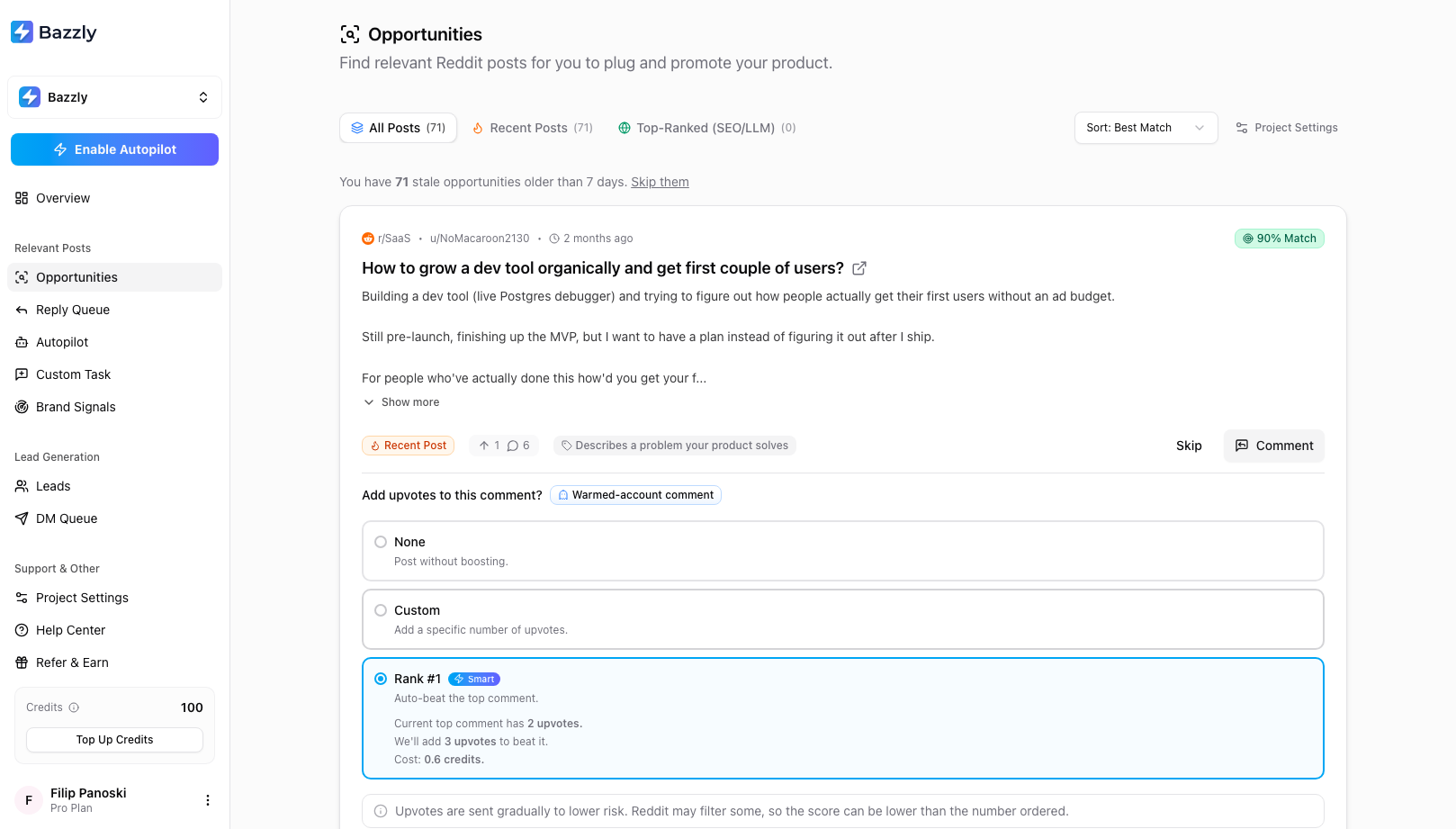
Rank #1 checks the thread's top comment and adds just enough upvotes to pass it.
- None posts without boosting.
- Custom adds a fixed number. Each upvote costs 0.2 credits.
- Rank #1 (Smart) reads the current top comment's score and orders enough upvotes to beat it, showing the exact cost before you confirm. If the top comment cannot be read, use Custom instead.
Upvotes are sent gradually to lower risk. You are only charged for upvotes that registered on Reddit, and any that did not are refunded automatically. The score can still change afterwards. Orders are limited to 10 upvotes for safety. Your last choice is remembered for next time.
Click Add to queue. The card leaves Opportunities and the toast Comment added to your reply queue confirms it. From here on, track it in the Reply Queue.
Replying to any thread: Custom Task
Found a thread on your own, or want to reply to a specific comment rather than a post? Open Custom Task in the sidebar and paste the Reddit link (full links and app share links both work).
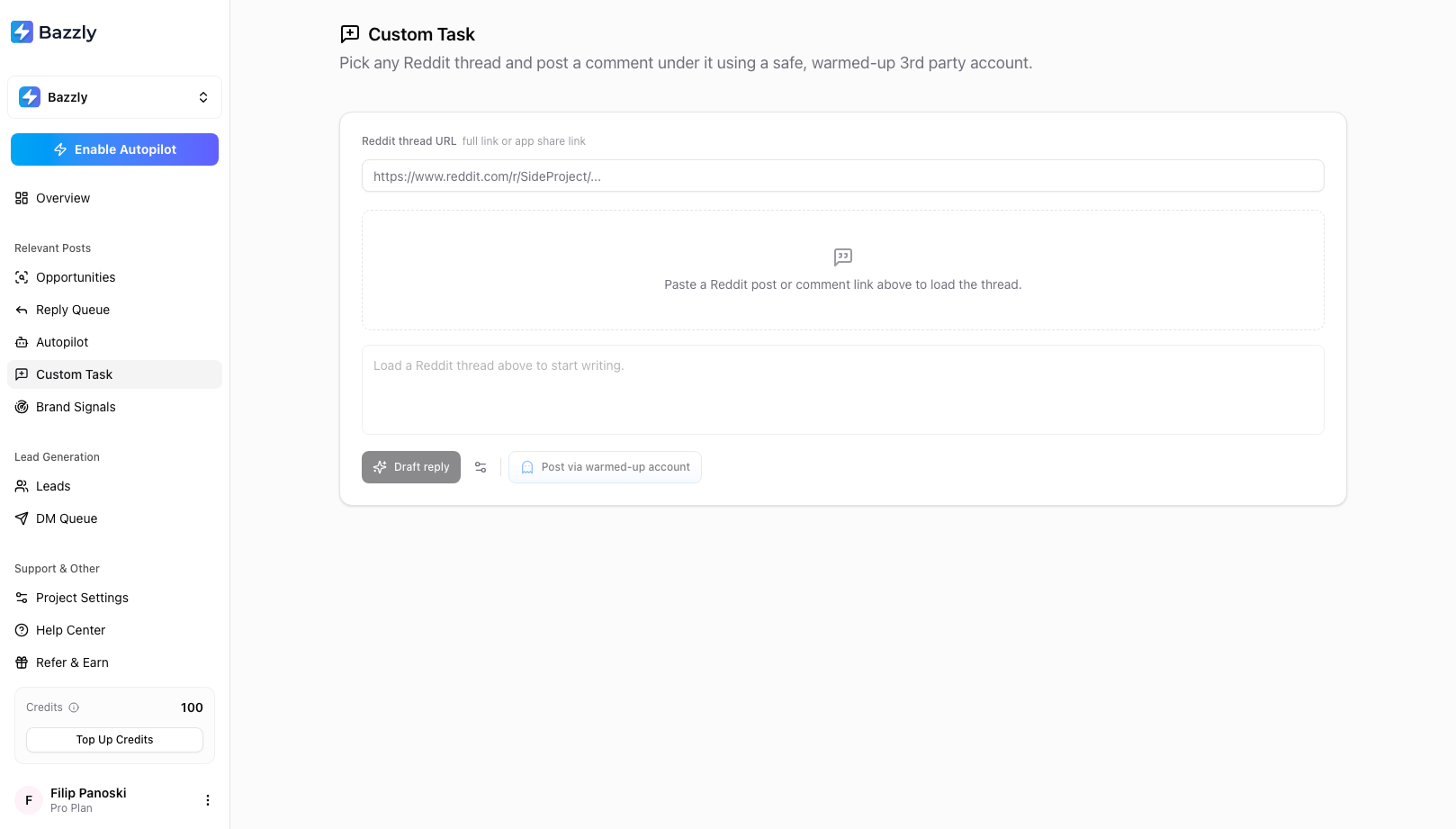
Custom Task gives you the same composer for any Reddit post or comment you choose.
Bazzly loads a preview of the thread, or of the specific comment you are replying to, and tells you if posting there is not possible. Custom tasks always post through a warmed-up account, and links are blocked outright. The Upvote tab on the same page lets you order upvotes on a post or comment without commenting at all.
What good looks like
- Reply where the poster is asking for exactly what you sell, or describing the pain you remove. Skip everything else.
- Answer the question fully. Mention your product once, near the end, as one option.
- Avoid links. They are the single biggest removal trigger.
- Match the subreddit's norms. Read a few top comments first if you are new to the community.
- Two thoughtful comments a day beat ten quick ones.
Frequently asked questions
- How much does it cost to reply to an opportunity?
- Drafting with AI costs 0.1 credits. Posting through a warmed-up account costs 10 credits, plus 0.2 credits per upvote if you add any. Posting from your own account through the browser extension is free.
- Why is the Post via warmed-up account button disabled?
- One of three reasons: the draft is empty or still generating, the draft contains a link, or the subreddit is strict about promotion and the post is not asking for tool recommendations or mentioning your product. Remove the link or use Post via my account.
- What does Top-Ranked mean and why does it matter?
- Top-ranked posts are Reddit threads that currently rank on Google for one of your project search queries. They keep receiving search traffic and are often quoted in AI answers, so a comment there stays visible far longer than a reply on a fresh post.
- Can I get an opportunity back after skipping it?
- Not from the list, but you can paste the thread URL into Custom Task and reply to it from there. Bulk-skipping stale opportunities does offer a five-second Undo in the toast.
Was this article helpful, or still stuck?
Contact support