Setting up your first project: product URL, keywords, and subreddits
How to dial in the keywords and subreddits that decide how relevant your opportunities are.
A project is everything Bazzly knows and does for one product: its description, the subreddits and Google searches it watches, the rules for what counts as a good opportunity, its DM template, and its credits. The quality of your opportunities comes almost entirely from how well the project is set up, so this article goes through every setting and what it changes.
Start with your product URL
When you create a project, Bazzly asks for one thing: the URL of the product you want to promote. It reads that page and fills in the rest.
- Product URL. Paste the page that best explains what your product does and who it is for, usually your homepage. Click Analyze My Product.
- Analyzing. Bazzly reads the page, extracts your product name, description, audience and competitors, and proposes subreddits and Google searches. This takes under a minute.
- Did we get this right? Check the product name (Bazzly uses it when mentioning you on Reddit), fix the description if anything is off (at least 70 characters helps matching), and confirm the competitors it found. Tap a suggested competitor to add it.
- Where we'll find your customers. Review the two discovery channels: the Google searches Bazzly will cover and the subreddits it will monitor. Click Start finding opportunities (or Finish and start free trial on your first project).
You can change all of this later, and you should: the first batch of opportunities tells you exactly which settings to tighten.
Tip: Bazzly limits URL analysis to 10 runs per hour. If you paste the wrong URL, fix it once rather than re-analyzing repeatedly.
Project Settings: the Product tab
Open Project Settings in the sidebar. The Product tab is the identity Bazzly uses to find posts and mention you.
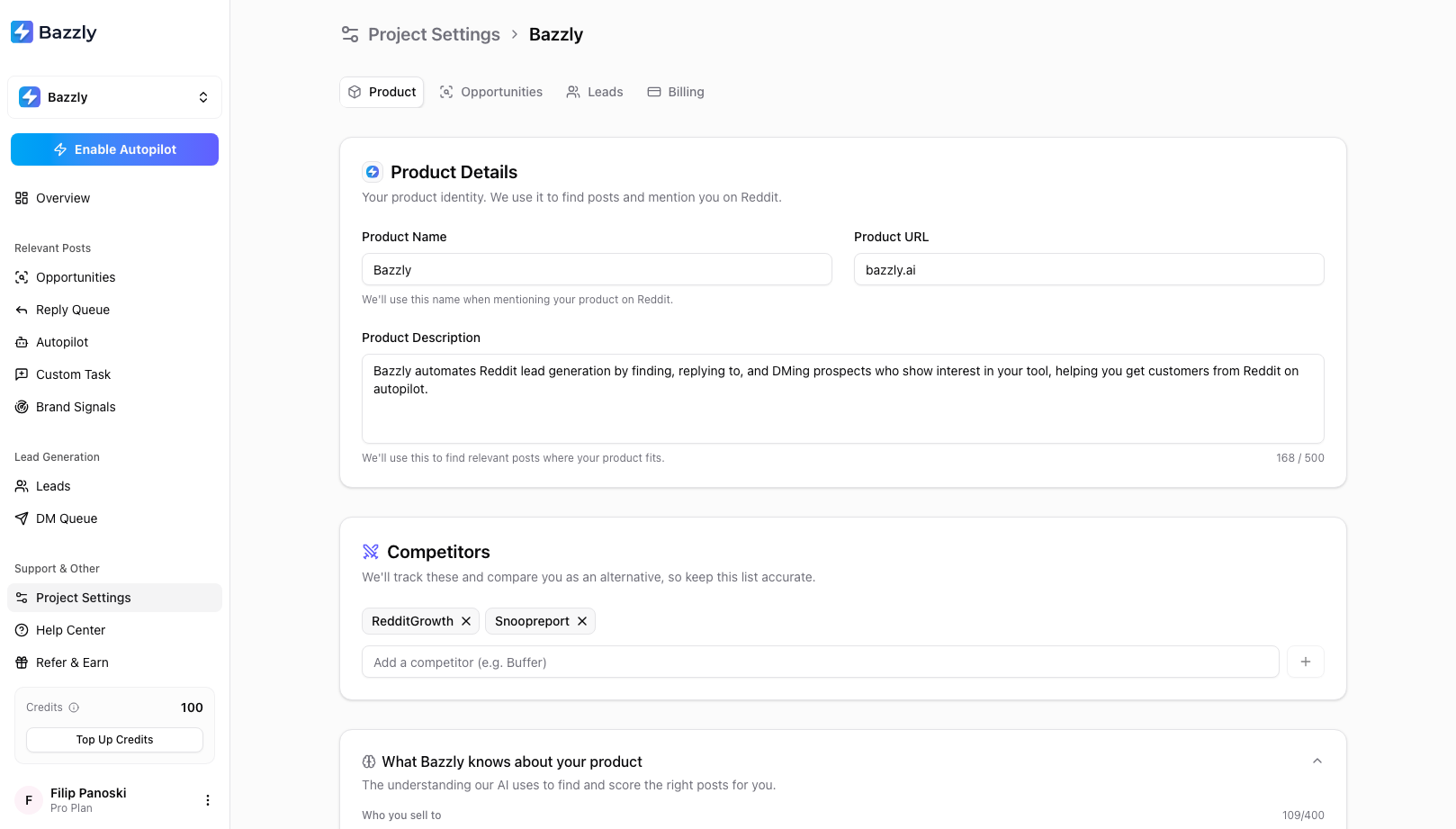
The Product tab: name, URL, description and competitors. Everything else is derived from these.
- Product Name is the exact string used in replies and DMs. If people know you as "Acme" rather than "Acme Analytics Inc", use "Acme".
- Product URL is what Bazzly analyzed. Changing it offers to re-analyze the new page.
- Product Description (70 to 500 characters) is the single most important field for matching. Describe the problem you solve and for whom, not your feature list.
- Competitors (up to 6) are tracked in Brand Signals and let Bazzly position you as an alternative when someone is unhappy with one of them.
Expand What Bazzly knows about your product to see the profile the AI actually scores against.
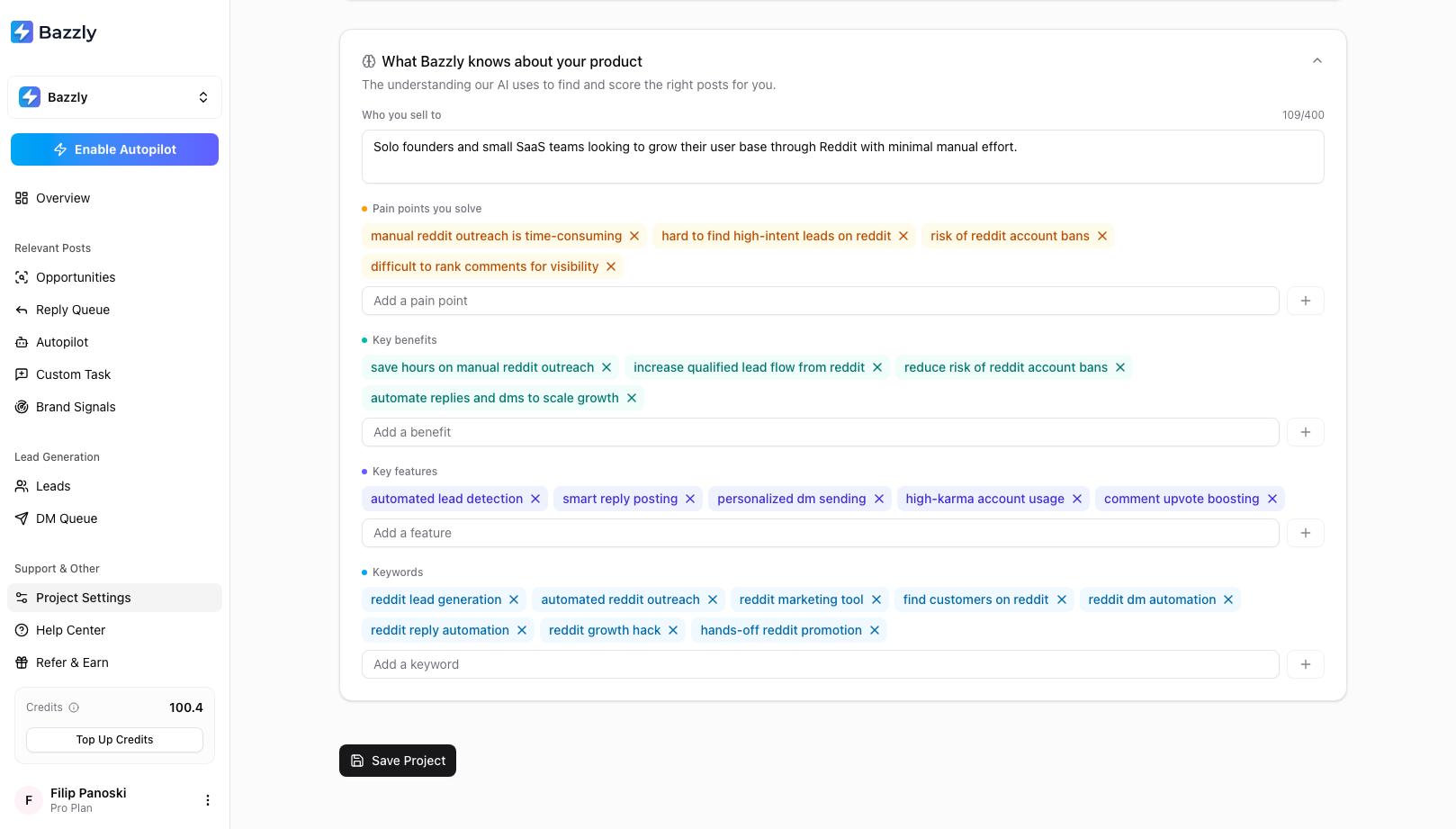
This profile is generated from your site and stays editable. Sharper pain points and keywords mean sharper opportunities.
- Who you sell to is your ideal customer in one or two sentences.
- Pain points you solve (up to 5) and Key benefits (up to 5) are what the scorer looks for in posts. If a post describes one of these pain points, it scores high.
- Key features (up to 6) help drafts mention the right capability.
- Keywords (up to 10) are the phrases your customers use when describing the problem. Remove anything generic; add the words people actually type.
Project Settings: the Opportunities tab
This tab controls where Bazzly looks and what it lets through.
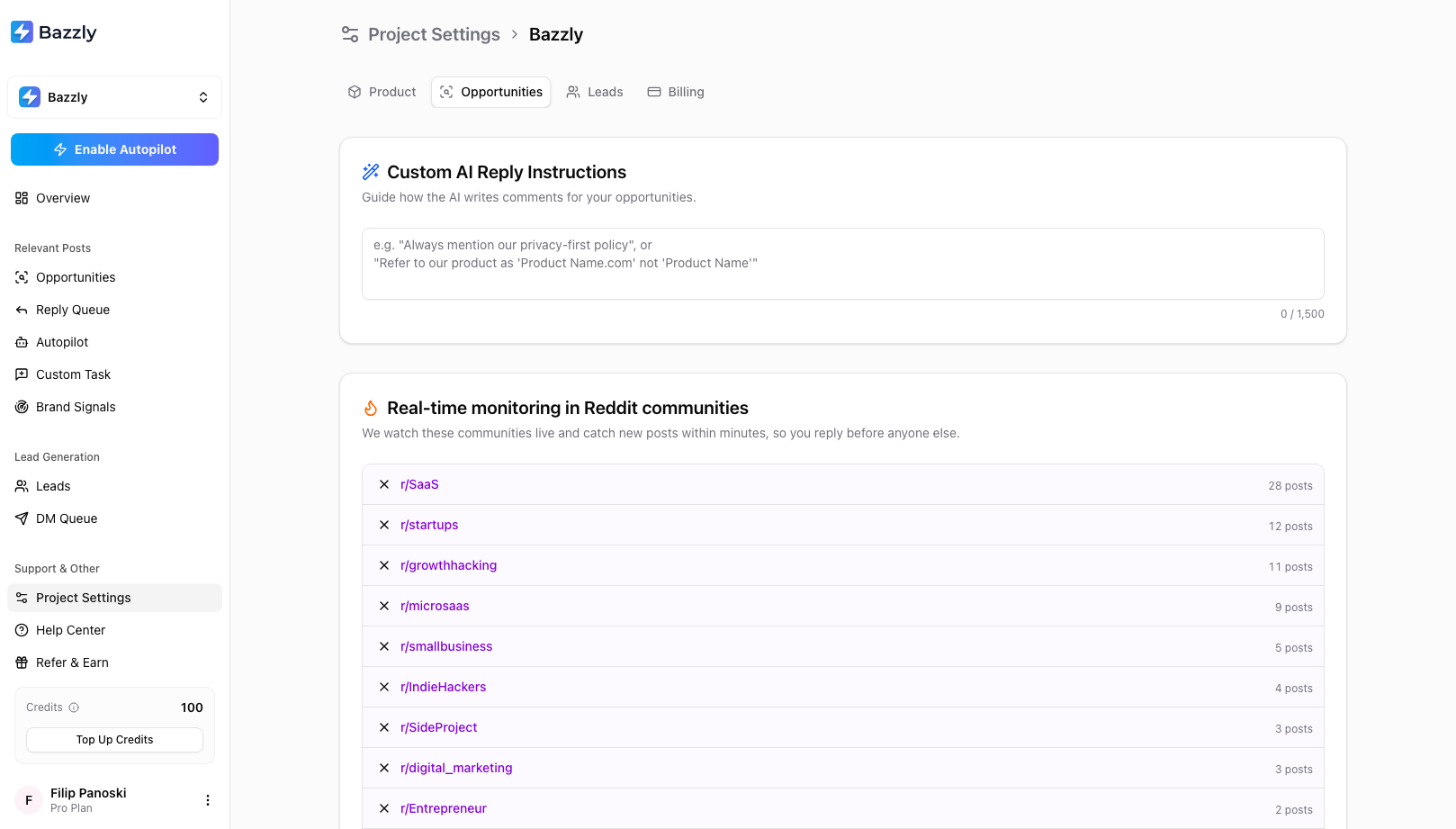
Reply instructions at the top, then the subreddits Bazzly monitors live, each with the number of posts it has produced.
Custom AI Reply Instructions (up to 1,500 characters) shape every draft for this project. Good instructions are specific: "Always mention that we have a free tier", "Refer to the product as one word, Acme", "Never compare us to CompetitorX by name". Keep URLs out of them, because comments with links are removed far more often and Autopilot will pause if drafts keep containing links.
Real-time monitoring in Reddit communities lists the subreddits Bazzly watches, up to 10 per project. The post count next to each shows how much it has produced for you. Drop the ones that never produce a good match and add the niche communities where your customers actually ask questions. The free Subreddit Finder helps if you are not sure where they are.
Top-ranking Reddit posts on Google lists the searches Bazzly covers (up to 15). Each one is a query a customer would type when looking for a solution, ending in "reddit". Bazzly finds the threads ranking for it and surfaces them under the Top-Ranked tab. Add the searches you would want to rank for yourself.
Expand Opportunity Filters to set the rules for what reaches your Opportunities page.
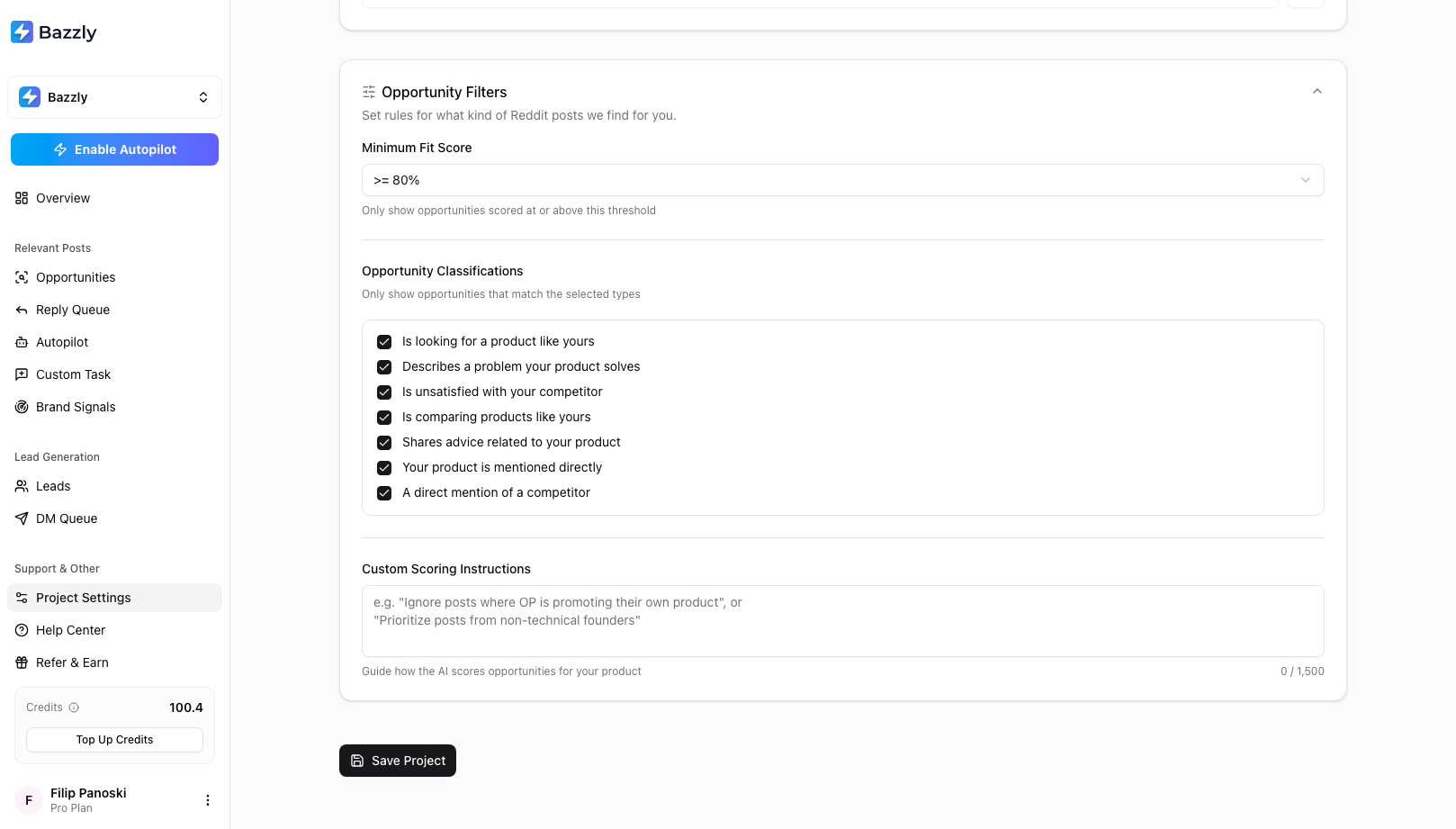
Filters decide what you see. Autopilot has its own, stricter threshold on top of these.
- Minimum Fit Score (80% by default) hides anything below it. Lower it if you see too few opportunities; raise it if you see weak ones.
- Opportunity Classifications let you switch off whole categories, for example if you never want to reply to posts that merely mention a competitor.
- Custom Scoring Instructions (up to 1,500 characters) tell the scorer what to prioritise or ignore, such as "Ignore posts where the author is promoting their own product".
Project Settings: the Leads tab
The Leads tab holds your DM template and the Auto-Queue DMs switch. Both are covered in Finding leads and sending DMs.
Click Save Project after any change. Settings apply to new opportunities from that point on; posts already scored keep their score.
More than one product
Each product gets its own project with separate opportunities, leads, settings and credits. Open the project switcher at the top of the sidebar to add or switch projects. Additional active projects are billed as extra seats on your plan, prorated for the current period, and you can have at most two unfinished draft projects at a time. See Credits, plans, and billing for the details.
A tuning routine that works
- After the first day, open Opportunities and skim the top 20. Skip the ones that are off-topic and note why they matched.
- If they matched on a vague keyword, remove it. If they came from one subreddit, remove that subreddit.
- If good posts are missing, lower the Minimum Fit Score by 5 points, or add the subreddit where you saw them.
- Repeat once a week for the first month. Match quality compounds.
Frequently asked questions
- Can I change the product URL after creating the project?
- Yes. Edit Product URL on the Product tab of Project Settings. Bazzly offers to re-analyze the new page and refresh the profile; you can accept the new values or keep your edits.
- Why do I see so few opportunities?
- Usually the Minimum Fit Score is too strict for your niche, or the monitored subreddits are too quiet. Lower the threshold by five points, add one or two larger subreddits where your customers post, and check that your keywords are phrases people really use. Give it a day after each change.
- How many subreddits and searches can a project watch?
- Up to 10 subreddits for real-time monitoring and up to 15 Google searches for top-ranking threads. Bazzly also adjusts the subreddit list over time based on which communities perform best for you.
- Do settings changes affect opportunities already found?
- No. Posts already scored keep their score and classification. New settings apply to posts found after you save. The Minimum Fit Score filter is applied at display time, so raising it hides existing low scores immediately.
Was this article helpful, or still stuck?
Contact support